


Competitive Alerting: Being Proactive Instead of Reactive
From passive to proactive
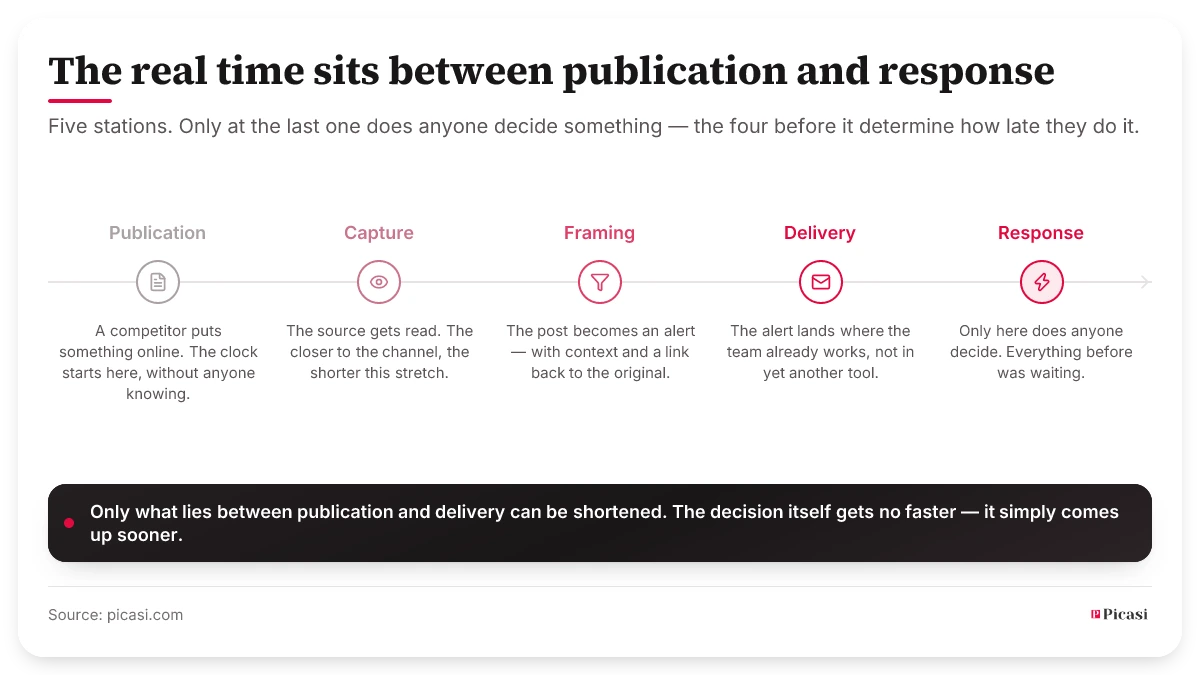
Competitive Alerting is the difference between reacting and reacting in time. Instead of opening ten browser tabs every day, the relevant information comes to you automatically: complete with context, a link to the original post, and a clear answer to the question: Do we need to take action now?
What is Competitive Alerting?
I regularly speak with CMOs in the B2B sector. The most common frustration I hear goes something like this: "I found out last week that our main competitor had lowered its prices, but the post was already ten days old." Ten days during which the sales team was working with outdated battle cards.
Competitive Alerting solves exactly this problem. Instead of manually checking dozens of sources every day and scrolling through updates, you receive automatic notifications for strategically relevant events: product launches, pricing changes, market entries. The result: You only invest time in genuine signals, not in searching for them.
Why Traditional Monitoring Isn't Enough
The problem with passive monitoring lies in three structural weaknesses.
1. Delay between the event and the response
A competitor launches a new feature → you notice it 3 days later during your weekly check → your team responds another 2 days later → 5-day delay. In fast-paced markets, these days can make all the difference. According to Crayon's State of Competitive Intelligence 2024, 65% of all B2B software deals are competitive – and 57% of CI managers say the market has become significantly more competitive than it was in 2020.
2. Cognitive Load: Too Many Updates
With 10 competitors, you'll see 30–50 updates per week. 90% of it is irrelevant: HR posts, events, generic content. The problem: you spend more time filtering than analyzing.
3. Inconsistency: Sometimes you miss something
You're on vacation. A colleague is sick. No one is monitoring the competition this week. A price change goes unnoticed, and the sales team spends two weeks working with outdated competitive intelligence. Competitive Alerting eliminates these problems.
The 3 alert tiers: What triggers them and when?
Not every update requires an immediate notification. Define 3 alert levels – that’s the difference between an alert system you actually use and one you end up ignoring after two weeks.
Tier 1: Immediate notification (email/Slack)
This category is for strategically critical updates that require an immediate response. These include product launches ("Announcing Feature X"), pricing changes ("New pricing starting in Q2"), market entry ("Now available in DACH"), M&A activities ("Acquired Company Y"), and funding rounds ("Raised Series B").
You will be notified immediately, typically within 1–5 minutes of publication.
Tier 2: Daily Summary (Email)
These updates are relevant but not urgent: thought leadership ("Our CEO on the future of X"), partnerships ("Integration with Platform Z"), strategic hires ("VP of Sales for Germany, Austria, and Switzerland joins our team"), or case studies ("How Company A uses our product"). These updates are summarized once a day.
Tier 3: Weekly Summary (Dashboard)
The third category includes "nice-to-know" information that doesn't require immediate action: awards/recognition, event participation, general content, and HR posts. These summaries appear in the dashboard once a week, perfect for the start of the week.
How to Configure Alerts Properly
Step 1: Define your trigger keywords
Start with Tier 1 keywords: product-related terms such as "launch," "release," "announcing," "available now." Pricing signals such as "pricing," "€," "$," "free tier," "enterprise plan." Market expansion with "expansion," "now in," "DACH," "Europe." And M&A: "acquired," "acquisition," "merged," "partnership."
Terms such as "integration," "case study," "customer success," "VP," and "Director" are suitable for Tier 2 keywords.
Step 2: Configure contextual filters
Keywords alone aren't enough. Use AI/NLP to understand context, the word "launch" in the context of a product should trigger an alert, but "launch" in the context of an event should not. Here's a simple example:
"We're launching our new webinar series next week"
→ No alert (Webinar, not a product)
"We're launching our AI-powered analytics feature next week"
→ Alert (Product Launch)
Step 3: Select your alert channel
Email is well-suited for Tier 1 alerts because they are immediately visible. Slack or Teams are ideal for team-based alerts, as everyone is notified at the same time. For Tier 3 alerts, a dashboard that you review periodically is sufficient.
Practical example: Pricing change alert
Imagine this: your main competitor cuts prices by 20%.
No alert: A competitor posts a LinkedIn update on Monday at 2:00 p.m. – your team doesn’t check competitor sources until Friday – the internal meeting to discuss a response doesn’t take place until the following week – the price adjustment is implemented two weeks later. In the meantime, your sales team has been working with outdated battle cards.
With Alert: Competitor posts a LinkedIn update at 2:00 p.m. – Alert sent to CMO/Sales Lead at 2:05 p.m. – Emergency meeting at 4:00 p.m. – Pricing adjustment the next morning. One day instead of two weeks.
Avoiding alert fatigue
The biggest risk with competitive alerting: Too many alerts cause the team to ignore them, and the system becomes useless. The solution lies in strict filtering. Only genuine signals should trigger Tier 1 alerts. Use feedback loops (“Was this alert helpful?”) so that the AI learns what is truly relevant. Prioritize by source, a CEO post triggers an immediate alert, while a company page update goes into the daily summary.
And set thresholds: only trigger an alert when more than two competitors are doing the same thing at the same time, that’s usually a market signal, not a coincidence.
Tools for Competitive Monitoring
For a DIY approach, you can use Google Alerts (free, but with many false positives) and IFTTT/Zapier combined with RSS feeds or competitors' newsletters. Professional tools like Picasi offer Source-First Intelligence with AI filtering across all channels – LinkedIn, YouTube, newsletters, and RSS feeds all in one system.
According to Gartner's Market Guide for Competitive and Market Intelligence Tools (2024) 74% of tech marketing professionals must address CI challenges within 12 months, and the majority rely on automated alert systems as a first step.
Hours decide, not weeks
Competitive intelligence is only valuable if you can respond in a timely manner. And "in a timely manner" doesn't mean "this week", it means within hours. This isn't a luxury reserved for large teams with dedicated CI analysts. It's achievable for any marketing team that has set up its alert configuration properly from the start.
The setup effort is a one-time expense. The benefit, never missing an important competitor move again, is long-lasting.