


RSS Feed Monitoring: Why RSS Alone Isn't Enough
RSS feeds are an underrated tool. They’ve been around since 1999, survived the demise of Google Reader, and are currently experiencing a renaissance – The global RSS market is projected to grow from $2.4 billion (2024) to $4.5 billion by 2035. If you want to keep up with competitors’ blogs, podcasts, or industry news, a good RSS setup can take you surprisingly far, for free and with minimal effort.
However, as a comprehensive solution for B2B competitive monitoring, RSS has a major shortcoming: it cannot capture the most important B2B channels.
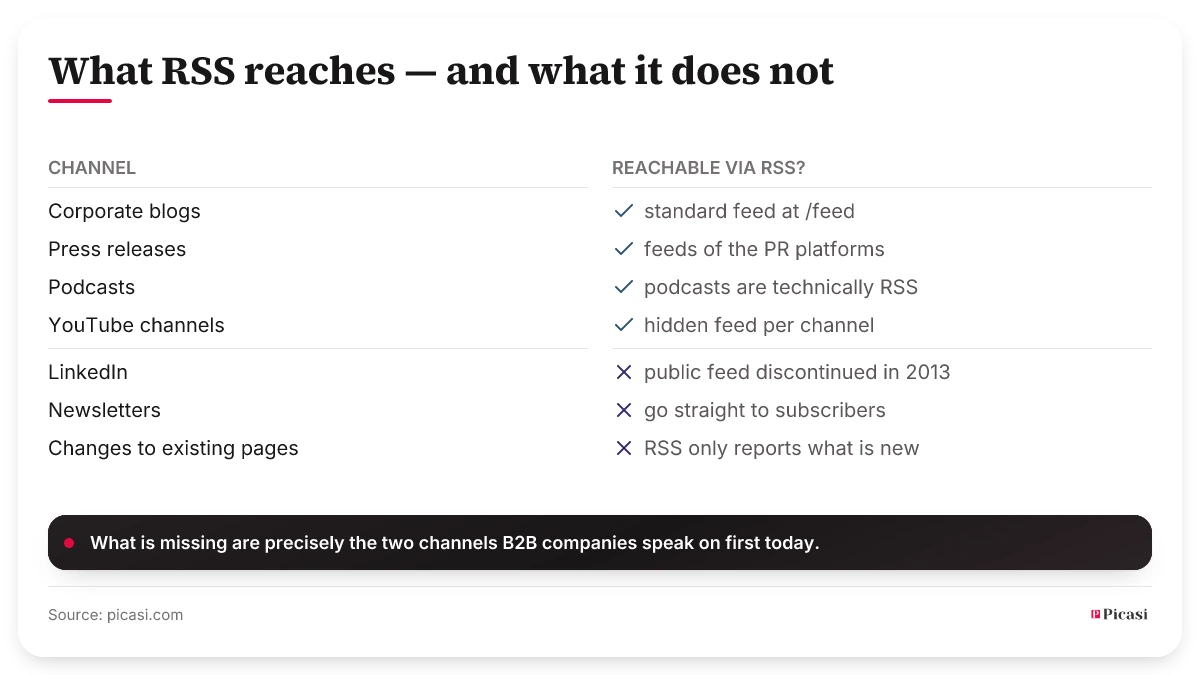
What RSS Does Really Well
Before we get to the limitations: RSS works great for these sources.
Corporate Blogs
Almost all serious B2B blogs have an RSS feed, often located under /feed, /rss.xml or /blog/feed. When a competitor publishes a new article, it automatically appears in your feed reader. That’s the classic strength of RSS.
Press Releases
PR platforms such as PR Newswire and Business Wire offer RSS feeds organized by company, industry, or region. These are particularly useful for anyone who wants to know when a competitor releases an official press release, especially for funding announcements and M&A activities, which are often first announced via press release.
Podcasts
Technically speaking, podcasts are RSS feeds. Every podcast channel has a feed URL, you can use it to automatically track when a competitor or an important industry source publishes a new episode.
YouTube Channels – The Hidden Trick
Very few people know this: YouTube offers a hidden RSS feed for every channel. The format is:
https://www.youtube.com/feeds/videos.xml?channel_id=[CHANNEL_ID]
You can find the channel ID in the URL of the channel page (for @handle channels: on the channel page, go to "About" → "Share" → "Copy channel ID"). Enter this URL into Feedly or Inoreader, and you'll be notified immediately whenever a new video is posted. This feed is much more reliable than the YouTube subscription feed, which is becoming increasingly unreliable due to algorithm changes.
The Limits of RSS
RSS covers a significant portion of public competitor communications, but not everything.
LinkedIn: No public feed
LinkedIn discontinued its public RSS feed for Company Pages in 2013. Since then, there has been no way to follow LinkedIn posts via RSS, neither company pages nor executive profiles. This is a significant problem, as LinkedIn is the most important channel for B2B companies when it comes to product launches, strategic hires, and market positioning.
I maintained an RSS setup myself that ran reliably for years, until one competitor's feed suddenly went quiet, even though the company kept posting merrily on LinkedIn. The fault wasn't with my reader. That source simply didn't exist anymore.
Newsletter: Not available by default
Email newsletters are sent directly to subscribers, there are no RSS feeds for them, unless the sender explicitly offers a web archive with an RSS feed (which is rare). For competitor newsletters, you’ll need a different approach, which we cover in the article on Newsletter Scanning.
Dynamic website changes
RSS only captures new content, not changes to existing pages. If a competitor updates their pricing page, feature overview, or job descriptions, you won’t be notified via RSS.
Maintenance requirements
RSS feeds break, get moved, or are discontinued, and you often don’t notice until weeks later, when updates stop coming. With 10 competitors, each with 3–4 RSS feeds, the maintenance effort involved is significant.
Making the Most of RSS: Practical Tips
If you want to use RSS as part of your monitoring setup, these tools and methods will go a long way, even without a specialized competitor analysis tool.
Feedly with AI filtering (Feedly Leo)
Feedly is the most widely used RSS reader for professional content monitoring. Its AI feature, "Feedly Leo," filters feeds by topic, filters out irrelevant articles, and generates a prioritized summary every day. This solves the signal-to-noise problem within the RSS ecosystem, at least in part.
Inoreader with keyword alerts
Inoreader offers keyword alerts: If a specific word appears in a feed entry, you’ll receive an immediate notification. This is useful for competitor keywords such as product names, “pricing,” or “Series B.”
Automation via Make or Zapier
New RSS feeds can be automatically forwarded to a Slack channel or a team dashboard, set up in just a few minutes using Make or Zapier. This solves the problem of limited team visibility and turns RSS into a true collaborative monitoring tool.
When RSS Reaches Its Limits
RSS is a solid building block, but it’s not enough if you want to answer the following questions:
- What did competitor X post on LinkedIn last week?
- What new videos has competitor Y posted on YouTube, and what do the comments say?
- What was in competitor Z's latest newsletter?
- Has Competitor X changed its pricing page?
For these questions, you need channels that RSS doesn't cover. RSS is currently experiencing a resurgence – but precisely because algorithms are becoming less reliable and social media reach is declining, the need for more direct access to sources is growing, not diminishing. RSS alone cannot fill this gap.
A solid start with a known gap
RSS isn't a dead medium, and with the YouTube feed trick, Feedly Leo, and a Make automation, you'll have a powerful, cost-effective setup for blogs, podcasts, and YouTube channels. This is a solid starting point for competitor monitoring.
The gap: LinkedIn and newsletters, the two most important sources of signals in B2B, are not captured by this method. Anyone who needs a complete picture must combine RSS with other channels. How to filter the truly relevant signals out of the collected data is explained in the article Signal vs. Noise in B2B Marketing.